When level design became a passion, I refused to accept Unity's shortcomings. Instead, I designed and co-built ProBuilder, a complete 3D modeling toolset directly in the game engine. It is still a top Unity asset, and it has been a joy to work directly with so many creators as a result.
Case studies & design philosophy
Features alone are not solutions.
Here, the solution was simplification and approachability instead of feature-rich complexity.
ProBuilder & ProGrids for Unity
The professional 3D level design and modelling tool used by millions of Unity developers. Designed and co-built from the ground up, now one of Unity's most beloved editor tools.
The challenge
Unity lacked a capable, integrated 3D modelling tool. Developers had to leave the editor to prototype levels and environments, breaking flow and slowing iteration. The challenge was to build something powerful enough for professionals but accessible to all skill levels - directly inside Unity.
My role
I designed and co-built ProBuilder from concept to production, including the full UX architecture, interaction model, and key feature design. I worked directly with game developers throughout - observing workflows, learning the vocabulary of level design, and building empathy with both novices and veterans.
Impact
- Critical tool for millions of Unity developers for over a decade
- Consistently among the highest-rated tools in the Unity ecosystem
- ProGrids companion tool became indispensable for precise scene layout
- Still actively used today as a primary level design workflow
What made it work
I began this project as the actual user, an accredited game designer and artist, with a passion for level design. Deep experience with old-school level design solutions gave me a strong sense of where simplicity creates power, and where tooling complexity starts to hurt real creative flow.
I also understood the technical cost of Unity's standard import/export process: too many steps, too much friction, and too many ways for iteration to break down. That let me directly show Unity users where the pain lived and clearly demonstrate why an in-engine 3D toolset had immediate, practical value.
The guiding principle was seamless and focused. Unlike other tools attempting similar goals, I focused on the core need first: simple, fast level blockout with no unnecessary complexity. "Fewer features" was not a limitation, it was a deliberate and proud selling point.
Splines for Unity
A first-class spline editing system integrated into Unity 2022.2 - enabling path-based workflows for roads, rails, cameras, and procedural geometry.
The challenge
Unity had no native spline tooling. Developers relied on third-party assets with inconsistent APIs and no platform integration. This was a foundational gap in the editor - paths, curves, and rails are essential for countless game genres and workflows.
My role
I pitched and primarily designed Splines for Unity, working through the full design process from authoring model to in-scene interaction design. The key challenge was making spline manipulation feel natural in 3D space - precise enough for technical users, approachable for beginners.
Impact
- Shipped in Unity 2022.2, adopted across the Unity ecosystem
- Enabled road, rail, camera, and procedural content workflows natively
- Platform for future animation and path-based tool development
Design for 3D
Spline editing is a deeply spatial design problem - control points, tangent handles, and path visualization all compete for clarity in a live 3D scene. I iterated extensively on visual language, handle affordances, and selection models to find a system that felt natural to both artists and engineers.
What made it work
Early and careful user research established the right level of complexity from the start. We also evaluated both Asset Store and internal Unity solutions, since those teams were essential stakeholders we needed to solve for and build trust with throughout development.
Partway through, a Unity shakeup required a fast roadmap pivot. I partnered with tech, PM, and stakeholder teams to restructure delivery into three phases: v1 focused on API so teams could begin testing and migration early, v2 focused on contextual user-facing UX for technical creators, and v3 added polish plus artist-friendly capabilities validated in research, including Animation, Instantiation, and Mesh Extrusion.
That pivot moved quickly and successfully because the groundwork was already in place: solid initial research, domain expertise, and close cross-team relationships that let us make confident decisions under time pressure.
Polysketch VR
A VR sketching and 3D concept design tool - bringing the immediacy of freehand drawing into spatial, volumetric space for designers and artists.
The challenge
3D concept design tools existed, but none captured the fluidity and immediacy of traditional sketching. VR offered a unique opportunity - to design in the actual space where a product or environment would exist. The challenge was making that feel natural rather than technical.
My role
I designed and co-built Polysketch, working through the interaction design challenges specific to VR - controller affordances, spatial UI, comfort, and the translation of 2D design intuitions into 3D space. Working directly in VR throughout development was essential to getting the feel right.
Impact
- Fluid poly-based sketching in true 3D space
- Designed for concept artists, industrial designers, and game developers
- Validated VR as a viable early-concept design medium
What made it work
Other VR modeling apps try to fully replace traditional 3D tools, but this rarely translates well in practice. Like with ProBuilder, I identified the opportunity in simplicity and designed the entire experience around sketching. Users sketch lines directly in 3D, then connect and fill polygons as they build.
The result is a surprisingly fun and creative workflow that is uniquely suited to VR. Interestingly, non-experienced creators often had the best experience: instead of getting lost in dense 2D UI, they began sketching immediately, understood behavior through physical and intuitive controls, and quickly built worlds, objects, and even complete characters.
Deep Dive
Foundation first.
Here, I recognized deep multi-org problems, and stepped back to solve at a foundational level.
Overlays + Contextual Tooling + Authoring Flows
I led the design of Unity's first fully connected tooling foundation: visible UI surfaces, context-aware logic, and consistent cross-view workflows for internal and external creators.
Role & Scope
"I lead the design of Contextual Tooling and Overlays (which formed a large part of Authoring Workflows), and helped build out the matching areas of their Editor Foundations website. These patterns were a first for Unity, and now guide both internal and external tool creators."
(1) Problem Recognition
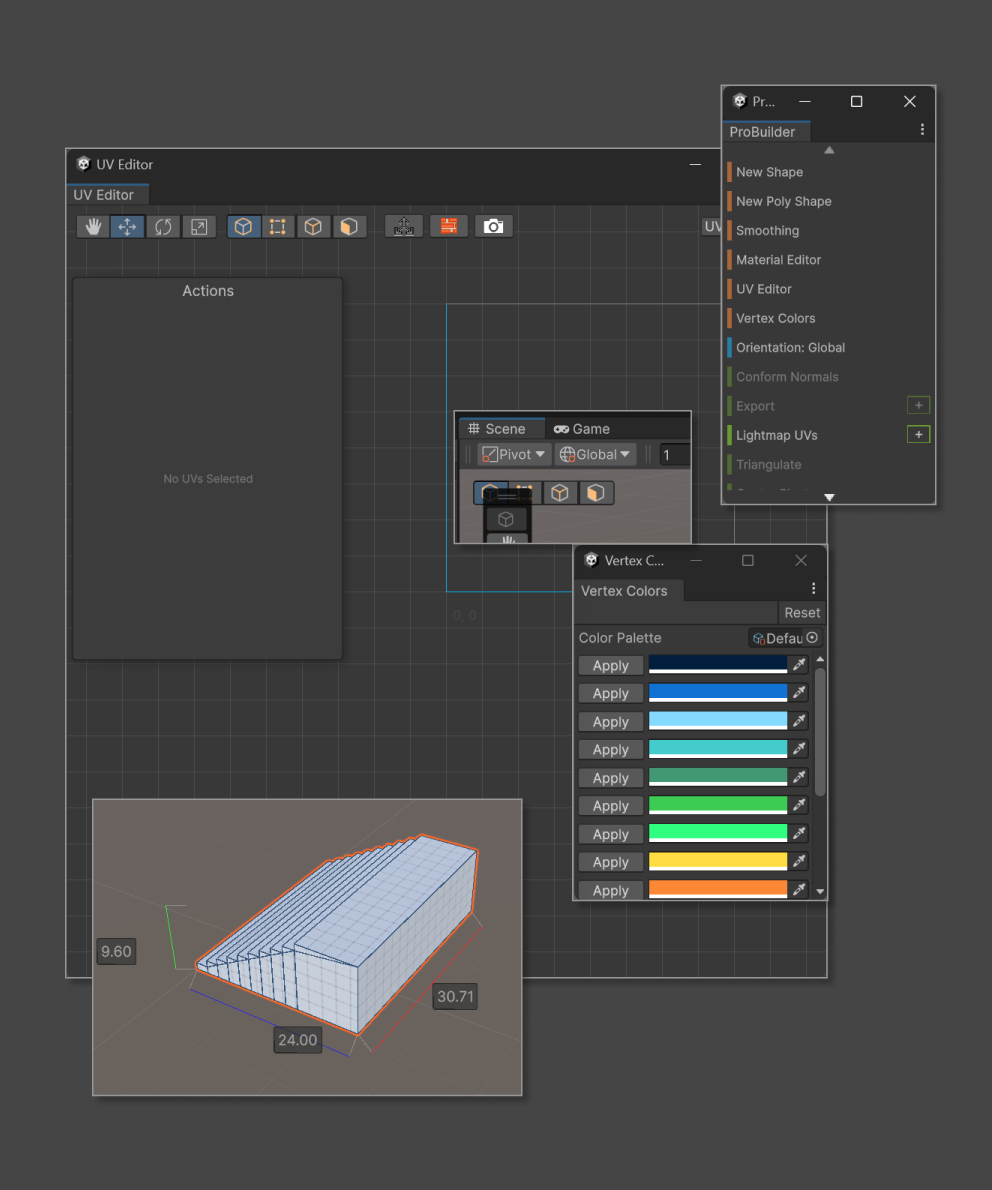
I used my own toolsets as problem examples to avoid creating friction with other teams. Here, I showcased how ProBuilder created UI conflicts and frequently broken workflows.
As design for Scene Tooling, I recognized that every new authoring-related feature had the same problem set, across all teams and orgs:
- Existing features were fully unique, complex, built on fragile custom code and generally poor UX
- New features and improvements required either expert, surgical care or complete rebuilds
- All cases were suffering - developers losing time on continuous bug fixes, designers needing to work around UI conflicts, and end users never having a clear set of patterns to learn and rely on
(2) Desired Outcome
As a mix of end user, designer, product owner, and developer, I envisioned a uniquely end-to-end better result, essentially a chain reaction:
Designer
Strong, clear ruleset to guide every design decision
Developer
Matching API to integrate with, no boilerplate reinvention
User
Learns the interaction model once — every new tool or update just works
(3) Research & Initial Collaboration
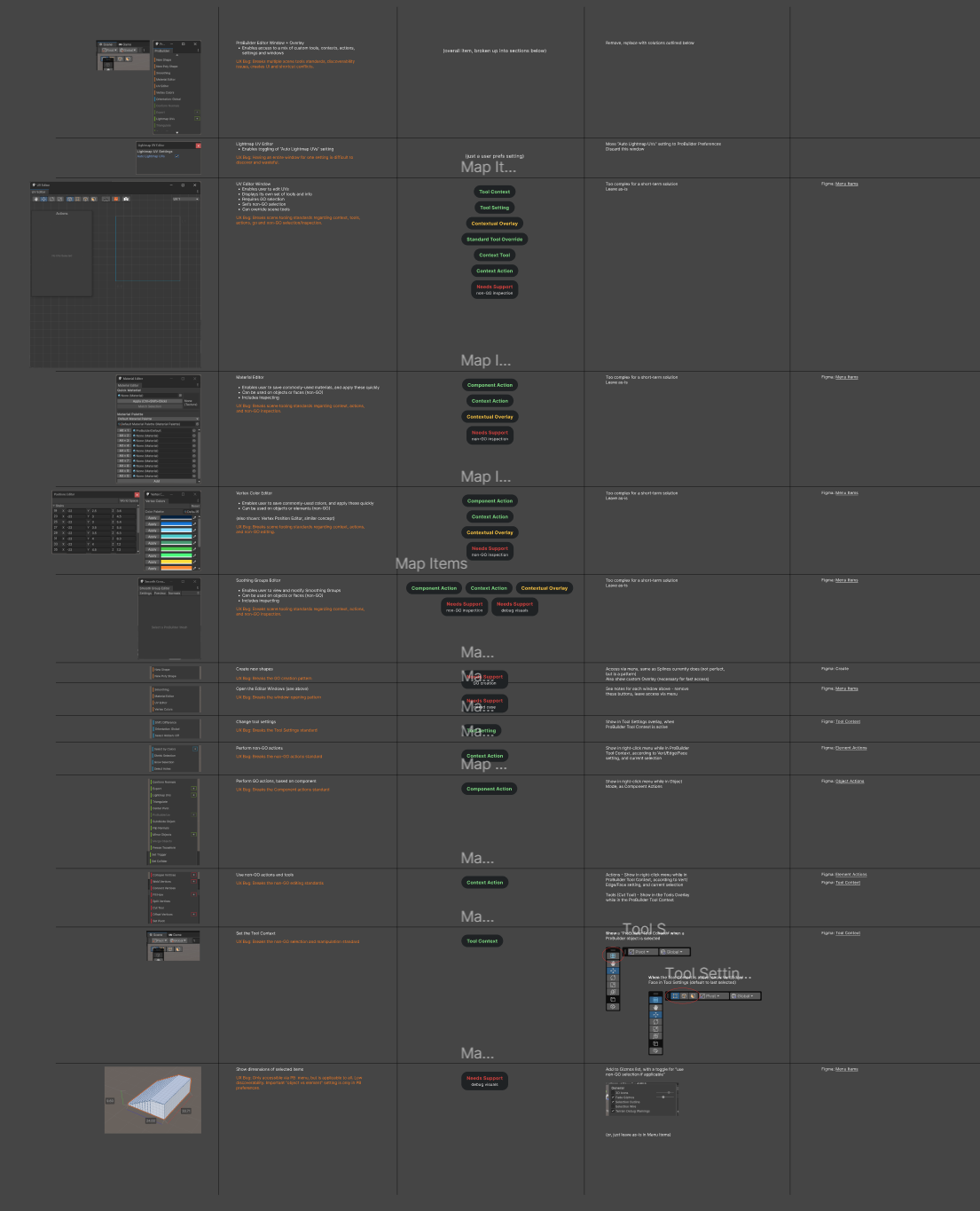
To better surface these hidden issues, I would create "maps" like this, with all areas of planned or existing features and where the lack of foundation caused issues.
The first discovery was organizational: teams had identified the same pain repeatedly, but considered it too broad for their immediate scope. I ran stakeholder conversations across design, engineering, and product to surface shared risks and align on outcomes. On the user side, people rarely filed this as one explicit "foundation" issue, but the symptoms were everywhere: recurring tool conflicts, rising complexity complaints, and custom workarounds for gaps in discoverability and consistency.
(4) Solution - Multi-Part
Together, these three patterns created one end-to-end foundation: clear user-facing surfaces, objective context logic, and consistent cross-view authoring behavior.
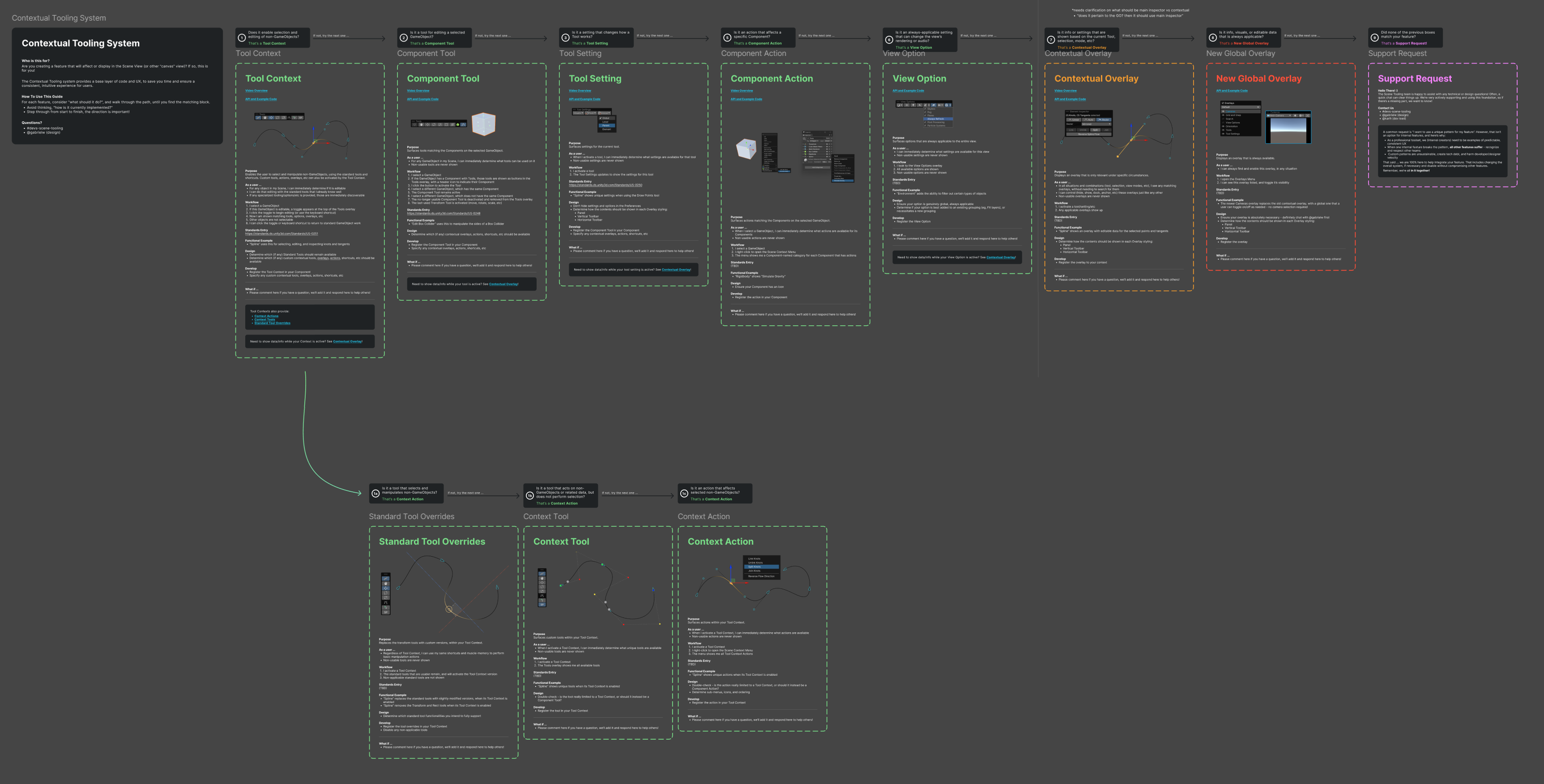
After working directly with stakeholders and users to build a complete understanding of needs for current and upcoming work, I designed and proposed this system as the initial "Contextual Tooling Solution". The decision tree style visual was carefully built to help teams understand how to convert or integrate their features.
(4a) Overlays
Overlays delivered the visible layer: friendly, customizable, non-conflicting panels users could arrange around their workflow.
(4b) Contextual Tooling
Contextual Tooling delivered objective context logic: APIs that resolved what to show based on selection, active tool, and active workspace, so users saw the right controls without noise.
(4c) Authoring Flows
Authoring Flows unified Overlays and Contextual Tooling into one reliable pattern spanning Scene, Game, Graph, and other interactive views, so teams stopped redesigning per-view systems.
(5) Proving & Rollout
I partnered first with Scene Tooling and applied the system to owned products including Splines, ProBuilder, and Grids to prove feasibility under real constraints. This reduced complexity and inconsistency while cutting design, engineering, and documentation overhead. I then worked with Terrain, World Gen, 2D, Graph, and UI Toolkit teams to map their needs, translate best practices, and ensure successful adoption across org boundaries.
(6) Impact
- First integrated tooling foundation used as a reference model across Unity's editor ecosystem
- Faster path from concept to shipped feature with less redundant implementation and fewer regressions
- Lower cognitive load for users through predictable, context-appropriate tooling behavior
- Clearer standards for external creators building Asset Store tools and studio pipelines
Mindful immersion transcends process.
Domain expertise and genuine user empathy enable fast intuitive leaps - tempered by careful validation, of course.
Overdrive Toolset
A growing suite of professional Unity tools - Pins, Scene Blocks, ProBuilder Plus, Snap, Collections, Multiverse and more - built from deep knowledge of where Unity falls short.
What it is
Overdrive is a toolset built by ex-Unity, award-winning creators with uniquely deep platform knowledge. Each tool targets a specific friction point in Unity's workflow - the kind of friction only visible after years of watching real developers work.
Key tools
- Pins - pin any variable to your Scene View for instant editing without hunting through Inspector panels
- Scene Blocks - per-GameObject source control in Unity Scenes, zero workflow changes required
- ProBuilder Plus - extended capabilities beyond the core ProBuilder feature set
- Snap - precision snapping system for spatial accuracy in scene layout
- Multiverse - simultaneous editing of multiple scenes, prefabs, and assets (in development)
- Collections, Todo, Action Pal - workflow and productivity utilities built for real project complexity
Why we're building this
After a decade inside Unity, I know exactly where the gaps are - the workflows that are frustrating, the tools that almost work, the missing features that cost developers hours. Overdrive is deep domain knowledge applied to every tool we ship, not features built from user surveys.